How Add a Product (Item)?
- Go to the “WP Payhip Sell” menu in your WordPress dashboard.
- Click the “Add New” button to create a new product (Item)
- Enter the title and description for your product, and upload any images that you want to include on the product page.
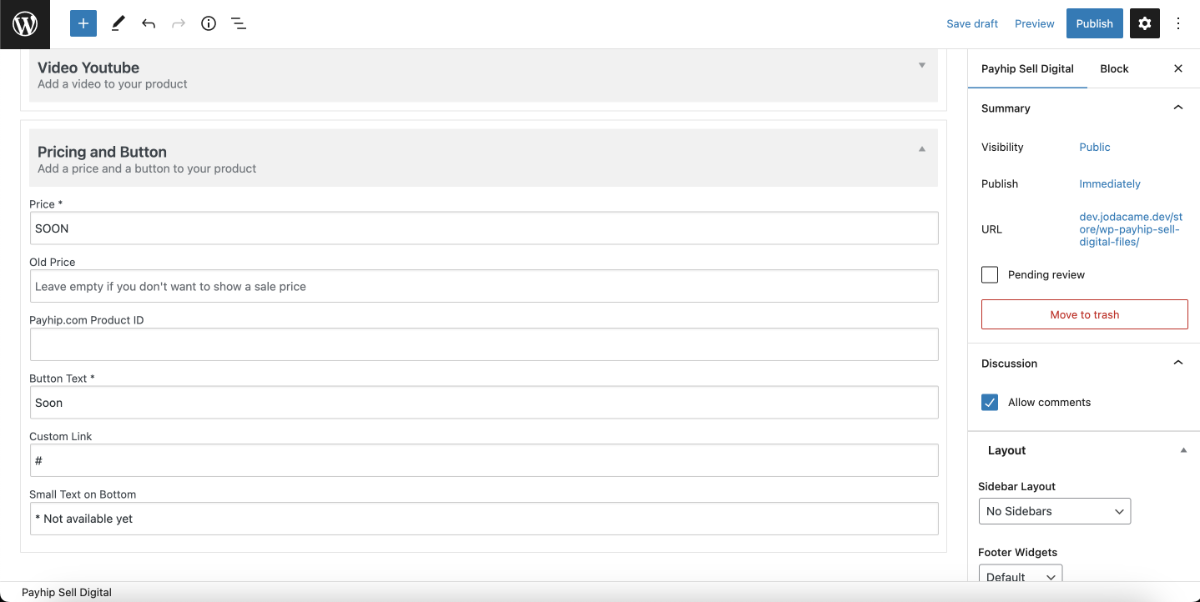
- Scroll down to the “Pricing Information” section and enter the Product ID and price of your product as it is listed on the Payhip platform.
- If you want to sell your product on other platforms in addition to Payhip, you can enter a custom link in the “Custom Link” field.
- Use the “Features” section to list any features or benefits of your product.
- Use the “Video” field to add a YouTube video to your product page by pasting the video’s url into the field.
- When you’re done, click the “Publish” button to save your changes and make your product live on your site.